.png)
Digital SOPs and work instructions replace the three-ring binder with step-by-step procedures that live at the station where the work happens, with version control built in and a record created as the task is done. For a food manufacturer the benefit is straightforward: operators follow the current version, supervisors can see that the steps were performed, and auditors get evidence without a hunt through binders. The shift from paper to digital is less about technology than about closing the gap between the written procedure and what actually happens on the floor.
A procedure only works if people are trained on it and you can show it, so see our guide to GMP training for food plant employees for what 21 CFR 117.4 requires and how to track training records.
SOP vs. Work Instruction
The terms overlap and companies use them differently. A common distinction: an SOP describes what is done and why for a process (for example, sanitation of a line or receiving of ingredients), while a work instruction gives the detailed, step-by-step how for a specific task at a specific station. Digital systems typically let an SOP link to the work instructions beneath it. Either way, what matters is that the person doing the job sees the current version at the moment they need it.
Why Paper SOPs Fail on the Floor
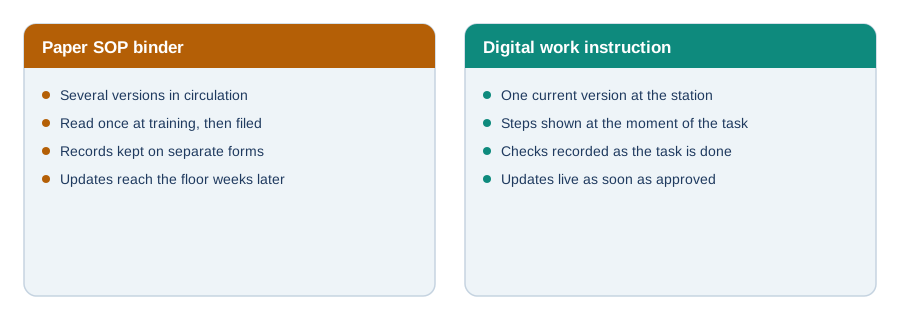
- Version drift. A revised procedure is approved, but the old printout is still taped to the wall.
- Read once, then filed. Procedures are covered in training and not seen again, so practice drifts from the document.
- Separate records. The SOP is in one binder and the log sheet in another, so evidence that the steps were done is weak.
- Slow updates. After a deviation or audit finding, getting the corrected procedure in front of every operator takes weeks.
What Makes a Good Digital Work Instruction
- Short steps in plain language. One action per step, written for the person at the line, not the auditor.
- Images or photos where a step is easy to get wrong, such as where to swab or how to assemble a changeover.
- Embedded checks. Critical limits, verification points, and acceptance criteria appear inside the steps, with fields to record the value.
- Clear ownership and versioning. A named author and approver, an effective date, and a visible version number.
- Links to the context. The instruction connects to the line, product, or lot it applies to.
The SOP Lifecycle
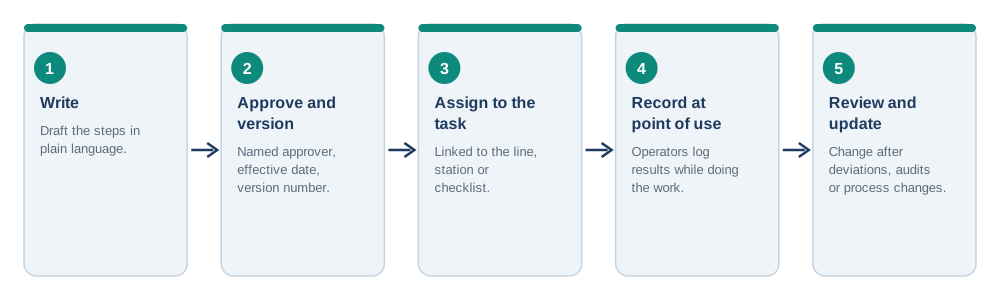
Digitizing the document is the easy part. The lifecycle is what keeps it useful: write the steps, approve and version them, assign them to the specific task or checklist, have operators record results at the point of use, and review them after deviations, audits, and process changes. A procedure that is never reviewed becomes a liability the day an auditor compares it to what they watch happen.
Digital SOPs and Food Safety Records
For records required under FDA's preventive controls rule, 21 CFR 117.305 states that records must contain actual values and observations from monitoring, be accurate and legible, and be created at the time the activity is performed, with identifying information such as date and the signature or initials of the person doing it. A digital instruction that captures the value and the operator as the step is completed produces that kind of record by default. Sanitation is a good example: sanitation controls under 117.135(c)(3) are procedures, practices, and processes that keep the facility sanitary, and our guide to sanitation SOPs (SSOPs) shows what those procedures contain. Procedures for hygiene, equipment, and the rest of your prerequisite programs are covered in our post on good manufacturing practices in food manufacturing.
How to Roll Out Digital Work Instructions
- Start with the procedures that generate the most records: pre-operational checks, receiving, CCP monitoring, and changeovers.
- Rewrite, don't just scan. A 12-page PDF on a tablet is still a 12-page PDF.
- Pilot on one line and ask the operators what's missing.
- Retire the paper. Remove old printouts the day the digital version goes live so nobody works from both.
- Set a review trigger for each instruction, such as a deviation, a change, or an annual review.
IONI’s operator floor checklists put procedures and the records they generate on the same screen, and IONI’s production and traceability software ties those tasks to the batches and lots they were performed on.
Two procedures worth digitizing early are maintenance and calibration logs and line changeover and line clearance.
Instructions only help if they are used at the station, which we cover in shop floor management software for food plants.
FAQ
What is a digital work instruction?
A digital work instruction is a step-by-step procedure shown electronically at the station where a task is done, with version control, and usually with fields to record results as the task is completed.
What is the difference between an SOP and a work instruction?
An SOP generally describes what is done and why for a process, while a work instruction gives the detailed how for a specific task. Companies use the terms differently, so define them in your document control procedure.
Do SOPs have to be digital?
No rule requires digital SOPs. The aim is that operators follow the current version and that required records are accurate, legible, and created at the time of the activity. Digital tools make that easier but are not mandatory.
How do digital SOPs help with audits?
They show the current approved version, who completed each step and when, and the recorded values, which reduces the time spent assembling evidence and shows that the written procedure matches what is done.
What should I digitize first?
Start with procedures that generate the most records or carry the most risk: pre-operational inspections, receiving, CCP monitoring, sanitation, and allergen changeovers.