.png)
Manufacturing software that works with QuickBooks lets a small manufacturer keep QuickBooks as its accounting system while running production, inventory by lot, and quality records in a system built for the plant floor. For food manufacturers the split is especially natural: QuickBooks is good at the general ledger, payables, receivables, payroll, and invoicing, while batch records, lot genealogy, receiving checks, and food safety evidence need tools designed around how food is actually made. The two connect so accounting gets accurate numbers and nobody has to migrate the books.
What QuickBooks Already Does Well
QuickBooks is an accounting system first, and for most small manufacturers it does that job well. Higher tiers go further into operations: Intuit's QuickBooks Desktop Enterprise manufacturing edition supports bills of materials and assembly builds, and Intuit's documentation notes that with Advanced Inventory you can switch inventory costing to FIFO and track lot or serial numbers. So "QuickBooks can't do manufacturing" isn't quite right - it can model what you build and what it costs.
Where It Stops for a Food Plant
What QuickBooks is built to answer is "what do we have and what is it worth?" What a food plant also has to answer is "what happened to this batch, and can we prove it?" That second question is where most small food manufacturers fall back to paper and spreadsheets:
- Batch genealogy. Which specific ingredient lots went into which production run, and which finished lots came out - including partial lots, rework, and blends.
- Floor records. Receiving temperatures and COA checks, cook and cool readings, CCP checks, allergen changeover sign-offs, and deviations tied to the batch they happened in.
- Physical rotation. FIFO costing is an accounting method; it doesn't tell an operator which pallet to pull. Food plants often need FEFO - first-expired, first-out - at the pick, which we cover in FEFO vs. FIFO for food manufacturers.
- Audit and recall evidence. A mock recall report or an SQF/BRCGS audit trail assembled from the records above, without a week of spreadsheet work.
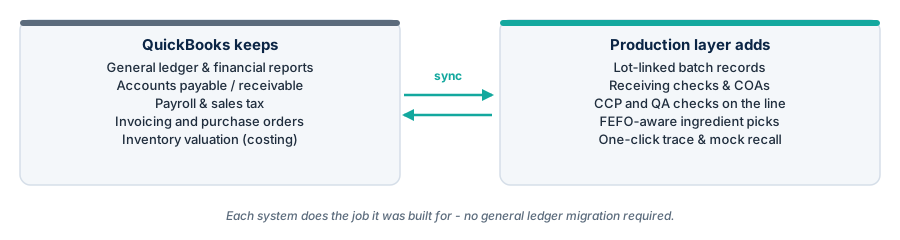
The Alternative: Replace QuickBooks With an ERP
The traditional answer to these gaps was to move off QuickBooks onto a full ERP. That solves the floor problem by also replacing the accounting system - migrating the general ledger, retraining the office, and taking on a much bigger implementation. It can be the right call for multi-plant or multi-entity companies, but for many small manufacturers it's a large project aimed at the wrong problem. We break down that decision in our guide to food ERP software.
How a QuickBooks-Connected Production Layer Works
The idea is simple: operational detail lives where it's captured, and QuickBooks receives the summarized numbers it needs to keep the books right.
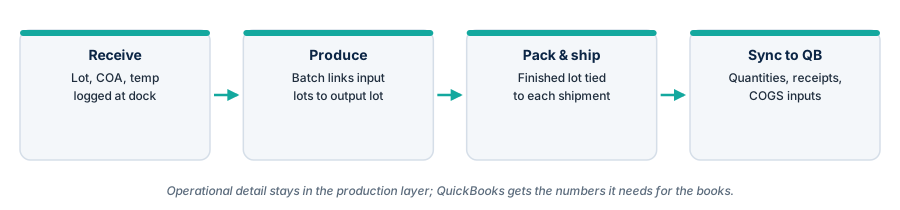
- Receiving: incoming ingredients are logged by lot with COA and temperature checks.
- Production: each batch record links input lots to the output lot, along with the checks performed during the run.
- Pack and ship: finished lots are tied to the shipments and customers that received them.
- Sync: quantities, receipts, and the inputs accounting needs for cost of goods flow to QuickBooks.
Real batch-level data also makes costing more honest. When actual yields and ingredient usage are recorded per batch, the cost picture in QuickBooks reflects what the plant really used - the same idea behind recipe and food costing software.
What to Look For
- A clear sync scope. Ask exactly which records sync (items, vendors, purchase orders, receipts, inventory adjustments, invoices), in which direction, and how conflicts are handled.
- Lot genealogy, not just lot fields. The system should link input lots to output lots through each batch automatically.
- Food safety records on the batch. Receiving checks, CCP readings, and deviations should live on the batch record, not in a separate binder.
- Fast traceability. A mock recall report in minutes, forward and backward.
- A floor-friendly interface. Operators on tablets at the line, not office staff re-keying paper at the end of the shift.
- A realistic rollout. Weeks, not quarters, and no general ledger migration. Our look at production planning for food manufacturers covers how scheduling fits into the same layer.
To see how standard and actual batch costs work before they reach the ledger, read standard cost vs actual cost in food manufacturing.
For how counts and variances reach your accounting data, see cycle counting and inventory reconciliation in food plants.
FAQ
Can QuickBooks be used for manufacturing?
Yes, within limits. QuickBooks can model assemblies and bills of materials, and QuickBooks Desktop Enterprise with Advanced Inventory adds lot numbers and FIFO costing. It is not designed to capture batch genealogy, floor-level quality checks, or food safety records.
Do I need to replace QuickBooks to get lot traceability?
No. A production and traceability layer can record lots, batches, and shipments and sync the accounting-relevant numbers to QuickBooks, so you keep your existing books.
What should sync between production software and QuickBooks?
Typically items, vendors, purchase orders and receipts, inventory quantities, finished goods, and the inputs needed for cost of goods. Detailed batch records and quality data stay in the production system.
Is IONI a replacement for QuickBooks?
No. IONI doesn't include a general ledger, AP/AR, or payroll. It's the production and traceability layer that runs on top of the QuickBooks you already have.
Keep QuickBooks. Add the batches, lots, and food safety records it wasn't built for. Explore IONI's production and traceability software.