.png)
Production tracking is recording what actually happened on the floor, run by run: what was planned, which ingredient lots were consumed, what checks were done, how much was made and wasted, and which finished lot came out. For a food manufacturer the goal is two-fold. Operations needs a live picture of the plant. Food safety needs the same records, because the lot-to-lot links that explain a yield variance are the same links a recall depends on. Done well, one set of records serves both.
What Should a Food Plant Track?
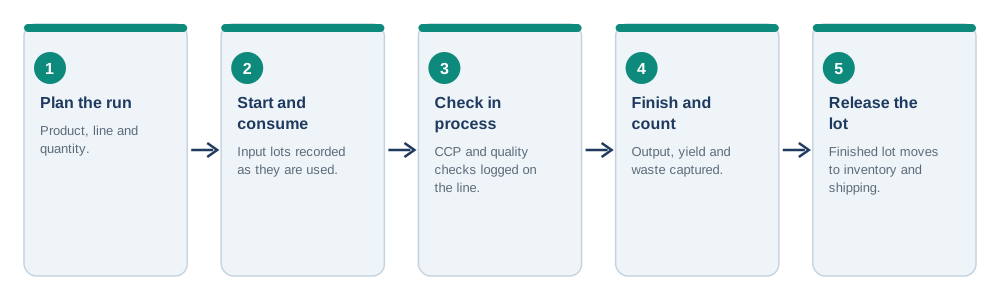
- Planned run. Product, line, quantity, and planned start. This is the baseline everything else is measured against.
- Start and consumption. Actual start time and the ingredient and packaging lots used. This is the link that makes traceability possible.
- In-process checks. Critical control point and quality checks recorded as they happen, with the value, time, and who did it. Under 21 CFR 117.305, records must contain actual values from monitoring, be accurate and legible, and be created at the time the activity is performed, with identifying information such as date and, where appropriate, product and lot.
- Finish and count. Good output, rework, waste, and downtime reasons.
- Finished lot. The lot code assigned, quantity, and where it goes next: inventory, hold, or shipment.
Paper vs. Live Production Tracking
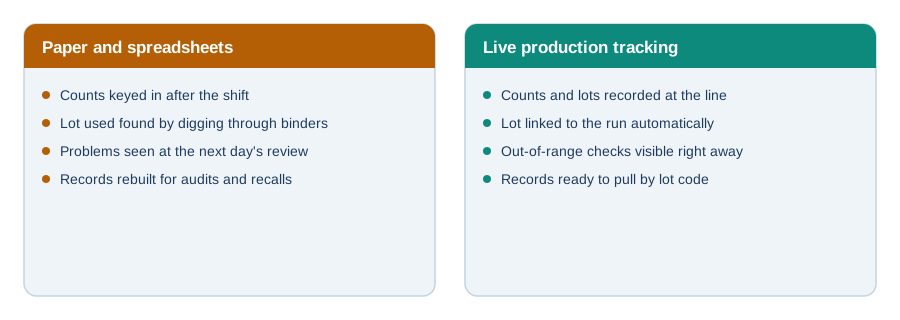
Most small plants start with clipboards and a spreadsheet. The problem isn't the medium; it's the delay. When counts are keyed in after the shift and the lot used lives in a binder, nobody sees a problem until the next day's review, and reconstructing a trace takes hours. Live tracking closes that gap by recording at the point of work, which is also the only way the record can honestly be "created at the time" of the activity.
Floor Visibility: Dashboards, Shift Handover, and Waste
Once runs are recorded as they happen, the plant can see things it couldn't before:
- Run status. What is running, what is next, and what is behind plan.
- Shift handover. The incoming shift sees what was done, what's open, and what was flagged, instead of relying on a verbal handoff.
- Waste and rework. Where product is being lost, by line, product, and reason, so it can be addressed.
- Yield by lot. Actual output against input for each run, which also feeds costing; see our post on recipe and food costing software.
How Production Tracking Connects to Food Safety
A tracked run is already most of a batch record. If you want to go further and replace paper batch tickets entirely, see our guide to electronic batch records for food manufacturers. And because every run records which lots went in and which came out, it is the foundation of the lot-level trace described in our post on batch and lot tracking software.
What to Look For in Production Tracking Software
- Lot-aware by design. It should record input and output lots, not just counts. Generic manufacturing trackers often don't.
- Easy for operators. If it's slower than the clipboard, it won't be used.
- Checks live in the same record. CCP and quality checks logged with the run, not in a separate system.
- Works next to your accounting system. Most small manufacturers keep QuickBooks for the books. They need a production layer beside it, not a full ERP replacement.
- Fast retrieval. Pull everything about a lot, or every lot that used an ingredient, in minutes.
IONI’s production and traceability software is that production and traceability layer: it records batches, lots, receiving, and shipments with the checks done on the floor, and runs alongside your accounting system rather than replacing it.
FAQ
What is production tracking?
Production tracking is recording what actually happens in each production run: planned versus actual quantities, which ingredient lots were used, in-process checks, output, waste, and the finished lot produced.
What is the difference between production tracking and an ERP?
Production tracking covers the floor: runs, lots, checks, and output. A full ERP also handles the general ledger, payables and receivables, and payroll. Many small food manufacturers keep their accounting system and add production tracking beside it.
What should I track for each production run?
At minimum: product, line, planned and actual start, ingredient and packaging lots consumed, in-process checks with values, good output, rework and waste, and the finished lot code and destination.
Do production records need to be created at the time of the activity?
For records required under the FDA preventive controls rule, 21 CFR 117.305 states records must be created concurrently with the activity documented, and contain actual values and identifying information. Production tracking at the point of work supports that.
Can production tracking help with recalls?
Yes. When each run records the input lots it consumed and the finished lot it produced, you can trace in either direction quickly: from a suspect ingredient to the finished lots, or from a finished lot to its ingredients and customers.