Lot tracking software for food manufacturers records every ingredient lot you receive, which batch consumed it, which finished lots that batch produced and which customers received them. With those links in one system, a backward or forward trace takes minutes instead of days, and the same records support FSMA 204, SQF and BRCGS traceability and mock recalls.
For how lot-level stock is received, counted and reconciled day to day, see our guide to food inventory management software.
For more on the run-level records and the codes behind them, see our guides to lot codes and date coding and production tracking for food manufacturers.
Last updated: October 22, 2026
What "Batch" and "Lot" Actually Mean
A lot is a specific quantity of an ingredient or finished product produced under conditions considered uniform - typically everything received on the same delivery or produced in the same production run. A batch is the specific production run itself. Batch and lot tracking software's job is to record which input lots went into which batch, and which output lot(s) that batch produced.
The Traceability Chain, Stage by Stage
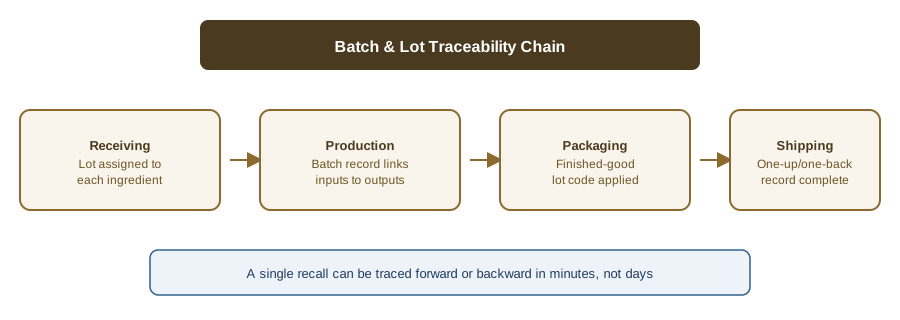
A complete chain runs from receiving (where an incoming ingredient lot is logged) through production (where a batch record links input lots to the batch), packaging (where a finished-good lot code is applied), and shipping (where the outbound shipment is tied back to that lot code). The table shows what to record at each stage, with illustrative codes.
| Stage | What to record | Example (illustrative) | Who records it |
|---|---|---|---|
| Receiving | Supplier, supplier lot, internal lot, quantity, date, COA | Flour, supplier lot 8812 → internal L-2210 | Receiving / QA |
| Storage | Location, status (hold/released), best-by | Dry store, released | Warehouse |
| Batch assembly | Batch code, lots consumed, quantities | B-1042 used L-2210 (50 kg) | Operator |
| Finished lot | Finished lot code, quantity, best-by | FL-1 (400 units) | QA |
| Shipment | Customer, finished lots, quantity, date | Customer A ← FL-1 (200) | Shipping |
A Worked Example: Tracing One Lot of Flour
The codes below are invented for illustration. The question is: a flour supplier tells you lot 8812 is recalled. Where did it go?
- Supplier lot received. Lot 8812 arrives and receiving assigns internal lot L-2210, with the COA attached.
- Consumed in a batch. An operator assembles batch B-1042 and records 50 kg of L-2210 as consumed.
- Finished lots created. B-1042 produces finished lots FL-1 (400 units) and FL-2 (250 units).
- Shipped to customers. FL-1 ships: 200 units to Customer A and 200 units to Customer B. FL-2 is still in the warehouse.
- Recall notice, trace query. Search by the supplier's lot 8812. The system walks forward: L-2210, then B-1042, then FL-1 and FL-2, then the two customers and the stock still on hand.
- Export the trace report. The result is one document that names the affected lots, customers and quantities, ready for the recall team, the customer notices and the auditor.
One-Up-One-Back vs. Full Batch Genealogy
"One-up-one-back" - knowing who you received a lot from and who you shipped it to - is the FDA's traditional baseline traceability expectation, and the minimum most facilities have historically kept. Full batch genealogy goes further: it reconstructs exactly which input lots went into a specific finished-good lot, not just who supplied and received it. FSMA 204's traceability requirements for High-Risk Foods push toward this deeper genealogy model, since a recall needs to isolate the specific affected lots, not every product a supplier ever shipped.
Lot Tracking Software Features Checklist
Beyond basic lot number fields, look for: automatic linking of input lots to output batches (not manual re-entry), FEFO-aware inventory so older lots are consumed first, a traceability report that can run a mock recall in minutes, and integration with your existing accounting system rather than a full system replacement - the same production and traceability layer, running on top of the QuickBooks you already have, described in our guide to solving food traceability challenges with AI. Use the table as a vendor questionnaire.
| Feature | Why it matters | Question to ask the vendor |
|---|---|---|
| Supplier lot ↔ internal lot cross-reference | Supplier recalls quote their lot number | Can I search by the supplier's lot? |
| Automatic batch and lot codes | Stops duplicate or missing codes | Can I set the code format? |
| Consumption capture on the floor | The batch-to-lot link is made where it happens | Is there a tablet or kiosk at the line? |
| FEFO/FIFO lot suggestions | Rotation and fewer write-offs | Does it suggest which lot to pick? |
| Backward and forward trace in one view | The recall scope answer | Can I go from an ingredient lot to customers in one screen? |
| Trace report export | Mock recalls, regulators, customers | Is there a PDF or CSV export? |
| COA attached to the lot | Proof the input met spec | Is the COA checked against the spec? |
| QuickBooks/ERP sync | No double entry | What syncs, and in which direction? |
If you are comparing systems, our food traceability software buyer's guide has a feature checklist and the FSMA 204 critical tracking events in one table.
Once lot data is linked, food recall management software can use it to scope and run a recall.
For the records and rotation that feed a good trace, see our guides to electronic batch records, FEFO vs. FIFO rotation, and when a food ERP is (and isn't) necessary.
For a bakery example of lot tracing from flour lot to customer shipment, see bakery production software.
Lot Tracking in QuickBooks, an ERP or a Dedicated Tool
Most small manufacturers keep QuickBooks for the books and need to decide where lot genealogy lives. Three options cover most plants.
| Option | Lot genealogy | Floor capture | Typical fit |
|---|---|---|---|
| Spreadsheets + QuickBooks | Manual; breaks at sub-batches | Paper, keyed later | Very small, few SKUs |
| ERP with a lot module | Yes | Often desk-entered | Larger plants with an ERP team |
| Dedicated production/traceability tool | Yes, batch-level | At the line | Small and mid-size plants on QuickBooks |
IONI is the production and traceability layer on top of the QuickBooks you already have, not a replacement for it. In IONI, batches move from planned to in progress to completed with automatic batch codes, operators record the raw-material lots or sub-batches each batch consumed (with FEFO lot suggestions), and finished lots link back to the batch. Receiving records inbound lots, including receiving against a purchase order, and a COA attached to a received lot is compared with the supplier's spec. The batch audit view shows check logs, the backward ingredient trace, forward shipments and change history, and a batch traceability PDF can be exported. QuickBooks sync covers suppliers, materials, purchase orders and shipments, as quantities only. For plants choosing between tools that connect to QuickBooks, see manufacturing software that works with QuickBooks.
How to Set Up Lot Tracking in 6 Steps
- Define the lot-code format. Decide how internal lot and batch codes are built and what goes on the label; see lot codes and date coding.
- Capture supplier lots at receiving. Record the supplier, the supplier's lot, your internal lot, quantity, date and COA for every delivery.
- Record consumption per batch. At the line, log which lots (and how much of each) went into the batch.
- Link finished lots to shipments. Every outbound shipment line should name the finished lot it came from.
- Run a mock recall and time it. Pick a supplier lot, trace it forward and back, and record how long it took and whether the quantities reconcile.
- Review gaps. Fix any missing links, then repeat the test on a different product group.
Lot Tracking and FSMA 204
FDA's Food Traceability Rule (FSMA 204) sets extra recordkeeping for foods on the Food Traceability List. For a manufacturer the structure is:
- Traceability Lot Code (TLC). FDA defines it as a descriptor, often alphanumeric, that uniquely identifies a traceability lot. A firm assigns a TLC when, for example, it transforms a food.
- Key Data Elements (KDEs). The specific data points recorded for each event and shared with supply chain partners. Which KDEs apply depends on the event.
- Critical Tracking Events (CTEs). The rule lists seven: harvesting, cooling before initial packing, initial packing of a raw agricultural commodity, first land-based receiving of a fishing-vessel food, shipping, receiving and transformation. A plant that makes food from ingredients on the list typically meets receiving, transformation and shipping.
The rule covers domestic and foreign firms that manufacture, process, pack or hold foods on the list, and foods that contain a listed food as an ingredient in the form that appears on the list; exemptions are in 21 CFR 1.1305. The original compliance date was January 20, 2026. FDA has proposed extending it by 30 months to July 20, 2028, and Congress directed FDA not to enforce the rule before that date. FDA's page still shows the original date in one place, so confirm the current date with FDA. For a plant-level walkthrough, see FSMA 204 for food manufacturers, and for tool selection, the buyer's guide.
FAQ
What is lot tracking software?
Lot tracking software records the lot of every ingredient you receive, the batch that used it, the finished lots that batch produced and the customers who received them, so you can trace a lot forward or backward from one system.
What is the difference between lot tracking and lot traceability?
Lot tracking is the recording: assigning codes and logging where each lot goes. Lot traceability is the result: being able to answer a trace question from those records. Lot traceability software is lot tracking software judged by how quickly and completely it answers that question.
What is a batch lot history record?
A batch lot history record is the record for one batch and its lots: the input lots consumed, the checks done, the quantities made and the finished lots and shipments that resulted. Keeping it with the batch makes a trace one lookup instead of a search through binders.
Does QuickBooks do lot tracking?
Intuit's help page says QuickBooks Desktop Enterprise supports serial or lot numbers once Advanced Inventory is turned on, and that you choose one or the other, not both. Intuit describes lot tracking as a way to see which customers bought from a lot. Check Intuit's page for your edition before relying on it.
How fast should a mock recall trace be?
The schemes ask for a timed, repeated test. BRCGS Food Safety Issue 9 (clause 3.9.3) requires a traceability test at least annually, including a quantity check or mass balance, and says traceability should be achievable within 4 hours. SQF Edition 10 requires the product trace system (2.6.2.1) and the recall system (2.6.3.2) to be tested at least annually. Run your own test and record the time.
Do I need a full ERP for batch and lot tracking?
No. Batch and lot tracking is a specific capability that can run as a layer on top of your existing accounting system rather than requiring a full ERP replacement.
See how IONI links batch and lot data from receiving through shipping. Book a demo or read about IONI's production and traceability software.