.png)
Food inventory management software tracks every ingredient, packaging item and finished good by lot and expiry date, not just by item and quantity. It records what was received, where it sits, which lot was used in which batch, and what is left, so you can rotate stock earliest-expiry first, reconcile counts to records, and trace any lot in minutes.
Last updated: October 7, 2026
What Food Inventory Management Software Does Differently
A general stock system answers "how many do we have?" Food inventory control software has to answer a harder question: "how many of which lot, expiring when, and where did the rest go?" Quantity on hand is not enough in a plant where one flour delivery can sit next to a flour delivery from three weeks earlier with a different expiry date, supplier lot and allergen status.
Three things separate food manufacturing inventory management from generic inventory tracking:
- The lot is the unit of record. Quantity, expiry, supplier and status (released, on hold, rejected) attach to the lot, not just the item.
- Consumption is linked. Each issue to production records which lot went into which batch. Our post on batch and lot tracking software explains why that link, not the on-hand count, is what makes a trace possible.
- Rotation is by expiry. Picks follow the earliest expiry date, as covered in our guide to FEFO vs. FIFO inventory rotation. The system can only suggest the right lot if expiry was captured at receiving.
If you are also weighing dedicated lot traceability software, our buyer's guide covers what to look for and maps the FSMA 204 tracking events.
Lot-Level Inventory: From Dock to Count
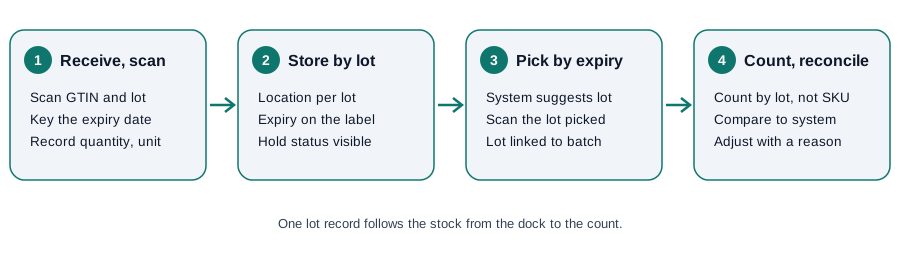
The flow is the same whether you run it on a handheld scanner or a tablet. What matters is that the lot record is created once, at the dock, and every later movement points back to it.
Receive and scan
At receiving, the lot record is built from the supplier's label and the delivery paperwork: supplier lot, expiry or best-before date, quantity, unit of measure and condition. Our receiving inspection checklist covers what to check at the dock before stock is released. A lot that fails inspection should enter the system as on hold or rejected, not as available.
Store and pick by lot
Assign each lot a location and keep different lots of the same item distinguishable on the shelf. When production requests an ingredient, the pick should name the lot with the earliest expiry that is released and not on hold. The picker then confirms the lot actually pulled, which is the record that later ties an ingredient lot to a batch.
Barcode Inventory System Basics
A barcode inventory system replaces typed lot numbers with scans, which removes the most common source of receiving and picking errors: mistyped characters. Many supplier cases carry GS1 barcodes. GS1 describes Application Identifiers as numeric prefixes that define the meaning and format of the data that follows; per the GS1 DataMatrix guideline, AI 01 carries the GTIN, AI 10 the batch or lot number (up to 20 alphanumeric characters), AI 15 a best-before date and AI 17 an expiration date, both in YYMMDD format.
In practice, three points matter:
- A scan of a GS1 label can capture GTIN, lot and date in one read, if the supplier encodes them. Many suppliers still print only an item code, so plan for manual entry of lot and expiry on those items.
- Print your own lot labels for anything you repack, blend or produce, so internal stock can be scanned the same way as received stock.
- Scanning confirms identity, not quantity. Weights and counts still need a calibrated scale or a deliberate count.
If you want background on GTINs and the wider standard, see What Is GS1?
Cycle Counting in a Food Plant
Cycle counting means counting a small, planned slice of inventory every day or week instead of shutting down for one annual physical count. It suits food plants because short-shelf-life stock moves fast and errors compound quickly. Counting by lot, not just by item, is what makes the result useful.
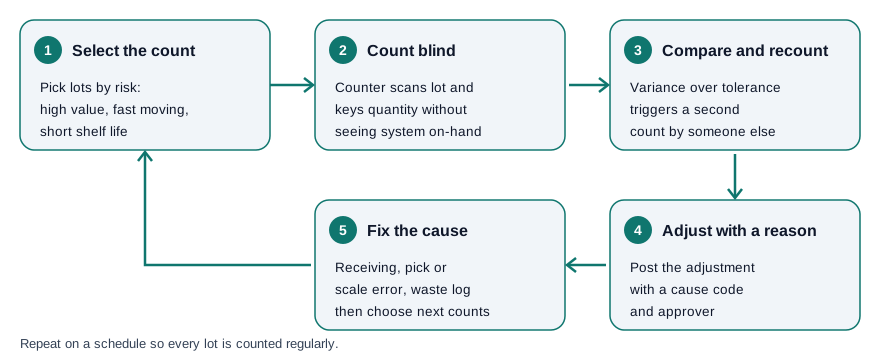
- Select what to count. Prioritize by risk: high-value items, fast movers, short-shelf-life lots, allergen ingredients and anything with a recent adjustment.
- Count blind. The counter scans the lot and enters the quantity without seeing the system on-hand figure, so the count is not nudged toward the expected number.
- Compare and recount. If the variance is outside your tolerance, a second person recounts before anything is adjusted. Set tolerances per item class; they are a management decision, not a regulatory number.
- Adjust with a reason. Post the adjustment against the specific lot with a cause code and an approver, so the audit trail shows what changed and why.
- Fix the cause. Repeated variances usually trace to unrecorded waste, unit-of-measure mistakes, receiving errors or picks of the wrong lot. Fix the process, then schedule the next counts.
Inventory Reconciliation: A Worked Example
Inventory reconciliation compares what your records say should be on hand with what a count finds, then explains the difference. The numbers below are illustrative only, not benchmarks. Take one flour lot, LOT-F-2041, tracked in kilograms:
| Line | Quantity (kg) | Source of the number |
|---|---|---|
| Opening balance | 500 | Last count or receipt record |
| Received this week | +1,000 | Receiving record |
| Issued to batches | -1,200 | Batch issue records, by lot |
| Logged waste | -20 | Waste log |
| Expected on hand | 280 | Calculated |
| Counted on hand | 262 | Cycle count |
| Variance | -18 (about 6.4%) | Counted minus expected |
An 18 kg shortfall is not yet an answer. Before adjusting, check whether a batch used more than its recipe called for, whether a partial bag was left at a line without being returned, whether scale drift is skewing issue weights, and whether some flour was consumed but never scanned. If the cause is an unscanned issue, the correction belongs on the batch record, not just on the stock balance, because the batch record is what a traceability lookup will read. Once explained, post the adjustment to LOT-F-2041 with the cause code.
Spreadsheet vs. Software for Inventory Control
Many small manufacturers start with spreadsheets, and for a handful of SKUs that can work. The gaps show up when you have multiple lots per item, expiry-driven rotation and a recall question to answer.
| Capability | Spreadsheet | Lot-level inventory software |
|---|---|---|
| Lot and expiry per receipt | Manual rows, easy to skip | Captured at receiving, tied to the lot |
| Pick the earliest-expiry lot | Operator judgment | System suggests the lot |
| Link lots to batches | Separate sheets, retyped | Recorded at issue |
| Barcode scanning | Not native | Scan to confirm lot and item |
| Cycle count and variance | Manual formulas | Count by lot, variance flagged |
| Change history | Overwritten cells | Adjustments with reason and user |
| Trace a lot forward and back | Hours of cross-referencing | A lookup |
What Records Should Capture
FDA's current good manufacturing practice and preventive controls rule sets general requirements for records. Under 21 CFR 117.305, records must be accurate, indelible and legible, created concurrently with the activity, and include the date, the signature or initials of the person who performed the activity, and the product and lot code where applicable. Section 117.315 requires records to be retained for at least 2 years. These requirements apply to the records Part 117 requires, such as monitoring and corrective action records, rather than to every inventory transaction, so confirm with your food safety plan which records are in scope. Lot-level inventory data makes it far easier to meet the "product and lot code" element wherever it applies. Our post on lot codes and date coding covers how to design the codes themselves.
Where IONI Fits
IONI is the production and traceability layer that runs on top of the QuickBooks you already use. It is not an ERP: it has no general ledger, accounts payable or receivable, or payroll. According to the food manufacturing software page, it tracks every ingredient lot from receiving through production to finished goods, so lot genealogy is available without searching paper records. Accounting stays where it is.
To keep counts accurate over time, see our guide to cycle counting and inventory reconciliation in food plants.
Frequently Asked Questions
What is food inventory management software?
It is software that tracks food ingredients, packaging and finished goods by lot and expiry date, records which lots go into which batches, and supports rotation, counts and traceability. It differs from generic inventory tools because the lot, not just the item, is the unit of record.
What is the difference between inventory software and an ERP?
An ERP covers accounting, purchasing, payroll and more. Inventory and traceability software focuses on lots, batches and stock movements and can run alongside the accounting package you already have, such as QuickBooks.
How often should a food plant do cycle counts?
There is no single required frequency. Many plants count a small risk-weighted selection daily or weekly, counting short-shelf-life and high-value lots more often than stable dry goods. Set the schedule from your own variance history.
Can I use barcode scanning if my suppliers do not print GS1 barcodes?
Yes. Scan your own printed lot labels once the lot is received and entered, and key in the supplier lot and expiry at the dock. Scanning still prevents mistakes at every later pick and count.
How do I handle an inventory variance?
Recount, check recent batch issues, waste logs and receipts for that lot, find the cause, and then post the adjustment against the specific lot with a reason and approver. Repeated variances point to a process problem to fix, not just a number to correct.
Does expiration date tracking matter if I rotate stock by eye?
Rotating by eye breaks down with several lots of one item and several shifts. Recording expiry per lot lets the system suggest the right pick and flags lots approaching their date before they become waste.