
Switching from paper or spreadsheets to digital food safety can start in 30 days if you move three records first, run them beside paper for two weeks, then retire the paper copy. The rules allow electronic records for Part 117, so the timing is your decision, not a mandate.
Last updated: November 24, 2026. Rules are cited from the Electronic Code of Federal Regulations and FDA pages, checked on that date. IONI is our product and appears in one section, with who should not choose it. This is general information, not legal advice.
Signs It Is Time to Switch
Nobody needs to switch because software exists. Switch when paper or Excel is costing you something you can point to:
- Audit prep takes days, because records are found by asking the person who filled them in.
- Several versions of the same spreadsheet exist, and nobody can say which one is the original.
- A missed check is discovered at review, a week later, instead of the same shift.
- Corrective actions are written down but nobody tracks whether they were closed.
- A customer or auditor asked for records you could only produce by scanning a binder.
- The person who built the spreadsheet is the only one who understands it.
If two or more of these are true, a controlled digital system will likely pay for the effort. If none are, a tidy paper system that meets the rules is still a legitimate choice.
What the Rules Say About Electronic Records
Part 117 does not require electronic records, and it does not forbid them. Under 21 CFR 117.305, you may keep original records, true copies such as scans, or electronic records, and Part 117 records that are electronic are exempt from 21 CFR Part 11 unless another law also requires the same record. Our post on whether 21 CFR Part 11 applies to food manufacturers walks through the exemption and what still applies.
For traceability, the Food Traceability Rule asks covered firms to give FDA an electronic sortable spreadsheet on request, with exceptions for small operations (21 CFR 1.1455). FDA's rule page, current as of November 4, 2026, gives July 20, 2028 as the date before which FDA will not enforce it, so check FDA's page for the current status. Your certification scheme and your customers set their own expectations on records, so read the current wording from your certification body. For a plain overview, see our guide to food safety documentation and recordkeeping.
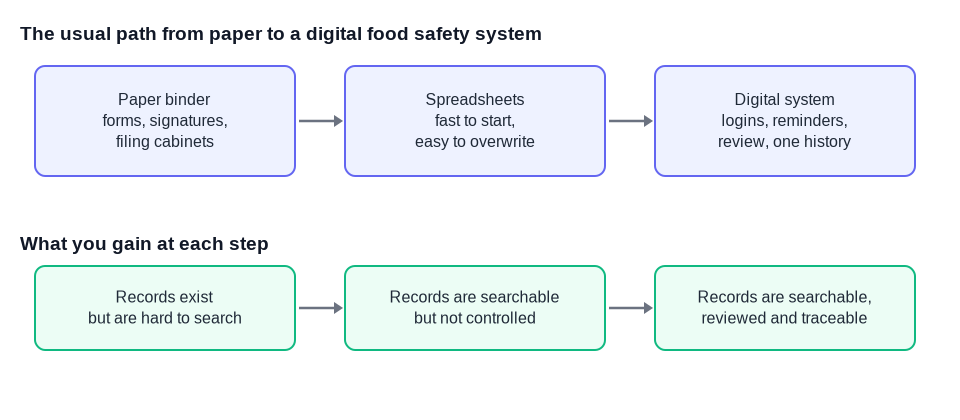
Paper vs Spreadsheet vs Software: What Actually Changes
Each option can meet the rules if you run it well. They differ in how much discipline you have to supply yourself.
| Question | Paper | Spreadsheet | Dedicated software |
|---|---|---|---|
| Who made the entry | Initials on the page | Whoever had the file open, unless you add a column | A unique login or PIN per person |
| Correcting a mistake | Strike-through, original still readable | Overwritten unless you keep a copy | Depends on the product, so ask for a demo of a correction |
| Finding a record | Binder and filing cabinet | Search inside one file or folder | Filter by date, person, lot or check |
| Missed checks | Found at review | Found at review | Can be flagged when due, depending on setup |
| Review and sign-off | Reviewer initials | A reviewer column, easy to skip | Can require a reviewer who is not the author |
| Link to a lot | Written by hand | Typed by hand | Can be linked to the lot or batch record |
| Cost to start | Lowest | Low | Subscription and setup time |
What to Digitize First
Start with the records that matter most when something goes wrong, and keep the first batch small. A sensible order for a food plant:
- Receiving and COA checks. Every traceability question starts at the dock. Our receiving inspection checklist shows what to capture.
- CCP monitoring. These are your highest-risk records. Our free CCP monitoring log is in the HACCP plan guide, and the definition is in our post on critical control points.
- Sanitation and prerequisite checks. See our guide to sanitation SOPs.
- Deviations and corrective actions. Give every deviation an owner and a due date, so closure is visible.
- Supplier documents. Certificates and specs, with expiry dates somebody can see.
- Training records. A training matrix is an easy first win.
Batch records and work instructions can follow once those are stable. See our posts on electronic batch records and digital SOPs and work instructions. If lot tracking is the bigger pain, read our food traceability software buyer's guide.
What a Digital System Needs to Hold Up in an Audit
Whatever you choose, test it against the same short list:
- Identity. Each person has their own login or PIN. Shared accounts break attribution.
- Time. The date and time of the activity are captured when it happens.
- Actual values. The system stores the real reading, not only pass or fail.
- Change history. A correction keeps the old value visible.
- Roles. Operators enter data. Reviewers sign off. Nobody signs off their own work.
- Retrieval and backup. You can find any record fast and export it.
- Lot links. Records tie to lots, so a mock recall is a search, not a hunt.
The record rules behind this list are in 21 CFR 117.305, and our post on ALCOA+ data integrity explains the habit. When you compare tools, our buyer's guide to food safety management system software lists the questions to ask.
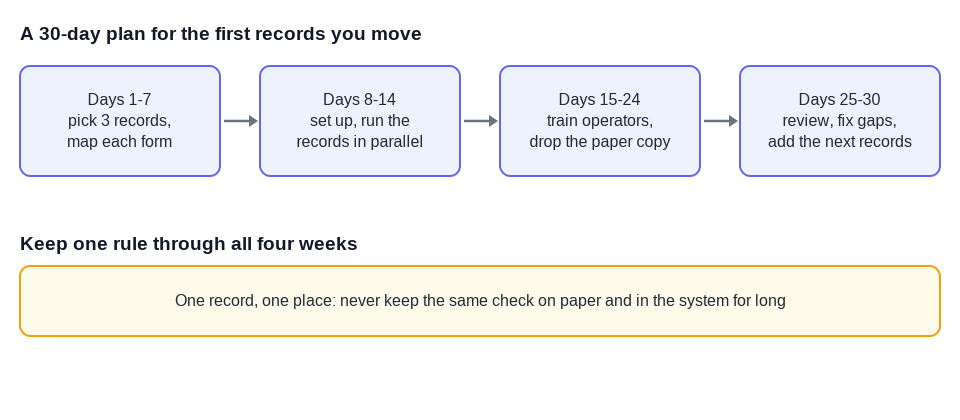
A 30-Day Plan to Switch Your First Records
Days 1 to 7: choose and map. Pick three records from the list above. For each, write down the fields, who fills it in, how often and who reviews it. Check the content against 21 CFR 117.305 and your food safety plan, because the new form must carry the same information.
Days 8 to 14: set up and run in parallel. Build the three records in your chosen tool. Run them next to the paper or spreadsheet copy, and compare the two at the end of each shift.
Days 15 to 24: train and cut over. Train every operator on the real task, including what to do when the tablet is not available. Then stop filling in the paper copy for those three records. Keep paper as the written fallback for outages.
Days 25 to 30: review and extend. Review the first month of records as an auditor would: who, when, actual value, reviewed. Fix the gaps, then add the next three records.
Where AI Helps (and Where IONI Fits)
The slow part of switching is usually typing existing paperwork into a new system. IONI is built to cut that step. You upload your SOPs and HACCP documents, and the AI document task proposes facility, product, hazard and check updates that you confirm one by one. The HACCP plan builder and an AI validation of the plan sit on top of that, and ingredient and supplier spreadsheets can be imported, with AI mapping the columns. Operators then run checks on a tablet or kiosk with a PIN, and each log keeps who filled it in and who reviewed it. Nobody can confirm their own log. IONI sits on top of the QuickBooks you already have as the production and traceability layer. See food safety compliance software for manufacturers and the HACCP plan builder.
Who should not choose IONI. If you need on-the-line statistical process control across many plants, an enterprise rollout with a dedicated implementation team, or an accounting system, a different tool fits better. IONI is not an ERP or accounting system. No tool makes a plant compliant on its own, and AI output is a draft your food safety team confirms. Book a demo and bring one of your own check logs.
FAQ
Is 21 CFR Part 11 required for food manufacturers?
Not for records required by Part 117. Section 117.305(g) exempts Part 117 records that are electronic, unless another law or regulation also requires the same record. The exemption does not remove the Part 117 record rules, such as actual values and the person who did the work.
Are electronic HACCP records accepted by auditors?
Part 117 allows electronic records, so the regulation is not the barrier. Certification bodies and customers judge the records themselves: complete, attributable, reviewed and easy to retrieve. Confirm the exact expectations in your scheme's current documents or with your certification body.
Can I keep using spreadsheets for food safety records?
Yes, if the spreadsheet meets the record rules and you control it: unique entries, visible corrections, a review step and a clear original. Most plants outgrow that when the controls depend on one person remembering to apply them.
What should I digitize first?
Start with receiving and COA checks and CCP monitoring, then sanitation checks, corrective actions, supplier documents and training. Move three records first and extend after a month.
How long does switching take?
The first three records can run digitally in about 30 days if the forms are already defined. A full move depends on how many records you have and how clean your source documents are, so plan in stages rather than one cutover.
Do I have to keep paper copies as well?
The rules do not ask you to keep both, but you need to know which record is the original for each activity. Keep a paper fallback for outages, and avoid running the same check on paper and in the system for long.
About the author: Alex Uspenskyi writes about food safety compliance and plant operations at IONI.